Posts

Showing posts matching the search for Security

AEM Security Headers

Image
Added Security in AEM via Headers:-  In design a robust architecture AEM Architects, Developers, Infrastructure Engineers regularly come across a challenge for adding the additional security in AEM.  In this article, we will understand the key security headers which can be used in webserver and give an additional layer of security for your Publish server and content.  I have used Apache webserver for all the examples.  This article covers -  1 - X-XSS protection  2 - HTTP Strick Transport Security 3 - X-Frame Option  4 - Content Security  1- X-XSS Protection:-  X-XSS-Protection header can prevent some level of XSS (cross-site-scripting ) attacks.  Configure the x-xss-protection header to 1 in your apache httpd.conf file or Vhost file if you have for all domains as applicable.   <IfModule mod_headers.c>   <FilesMatch "\.(htm|html)$">               ...

Security Headers & Cookie Management in Hybrid AEM CDN Setup on AWS CloudFront

Image
aemrules.com Security Headers & Cookie Management in Hybrid AEM CDN Setup on AWS CloudFront 7 min read  ·  Anuj Gangwar  ·  AEM Architect @ Adobe TL;DR Ask AI 5 things to know in 30 seconds 1 Never manage security headers on both EDS and AMS independently — enforce all of them at CloudFront only using a Response Headers Policy. One place, consistent everywhere. 2 Your CSP policy must be a superset covering both EDS and AMS — scripts, fonts, and connect sources from both origins in one unified policy. 3 Strip ALL cookies before forwarding to EDS origin. EDS is stateless — forwarding AMS session cookies destroys cache efficiency and every user gets a unique cache entry. 4 For AMS authenticated paths, whitelist only the cookies you need — typically login-token. Never forward all cookies blindly. 5 For SSO across EDS and AMS pages, use a lightweight JWT shared cookie reada...

HTTP Smuggling in AEM , How to prevent it ?

Image
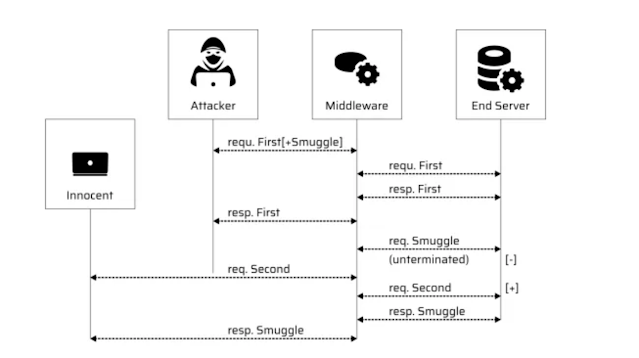
Protecting Adobe Experience Manager from HTTP Smuggling Attacks HTTP Smuggling is a technique used by attackers to inject malicious requests into a web application. This can cause significant security risks and data breaches if not addressed properly. In this blog, we will discuss what HTTP Smuggling is, how it can be exploited, and the solution to prevent it in Adobe Experience Manager (AEM). What is HTTP Smuggling? HTTP Smuggling is a technique where attackers can manipulate the HTTP requests sent to a web server to bypass security mechanisms. The attacker can manipulate the request in a way that makes it look like a legitimate request to the server, but in reality, it is carrying malicious payloads. This technique is particularly dangerous because it can be used to bypass firewalls, intrusion detection systems, and web application firewalls (WAFs). How can HTTP Smuggling be Exploited in AEM? AEM is a popular web content management system used by organizations worldwide. As with any ...

AEM Security in the Age of AI

Image
  AEM Security in the Age of AI: New Threats & How to Defend Against Them Introduction AI is changing the security landscape for AEM deployments in two important ways. First, attackers are using AI to make their attacks smarter — faster credential scanning, AI-generated phishing payloads, and automated vulnerability probing. Second, as AEM teams integrate AI features (chatbots, content generation, RAG pipelines), they introduce a new class of vulnerabilities that didn't exist before. In this post, we'll cover both: how to harden your existing AEM setup against AI-powered attacks, and how to secure the new AI integrations you're building.             1. Prompt Injection — The New XSS If you've built a chatbot or AI assistant on top of AEM content (like the RAG pipeline from our previous post), prompt injection is your biggest risk. It's the AI equivalent of XSS — an attacker embeds malicious instructions inside content that your AI system the...

Security best Practice in AEM

Image
 Adobe Experience Manager (AEM) is a popular content management system that is widely used by businesses to manage and publish digital content. With the increasing amount of sensitive data being stored and shared online, it's important for AEM users to be aware of the security features that the platform offers. In this blog, we'll discuss some of the key security features of AEM and provide tips for keeping your AEM instance secure. Authentication and Authorization AEM provides several options for authentication and authorization. Users can log in using their credentials, which can be verified using LDAP or other external identity providers. Once authenticated, users are assigned roles and permissions, which determine what actions they can perform within AEM. To keep your AEM instance secure, it's important to ensure that users only have the permissions they need to perform their jobs. For example, if a user doesn't need to publish content, they should not be given perm...

Configure/Decoding AEM AuditLogs

Image
AEM Developers, Infrastructure Engineers / Dev-ops teams working in the financial domain regularly come across a challenge for event auditing in AEM. This helps in identifying most of the activities happening in AEM. Audit logs are a very effective way to debug the content issue & to know what all is happening in your environment and by whom. This article addresses in a simple way on how to enable the audit logs, its different ways, and how to understand the audit logs.  This article covers the following - How can we enable Audit logs in AEM. How can we read and understand the Audit logs/ tools to use it. Audit log on file system in crx-quickstart/logs folder.   Audit logs for User creation / Modification. How can you archive/purge the audit logs. How can we enable Audit logs in AEM?            By Default, the Audit logs are pre-configured in AEM, for a few basic operations of DAM and for all other operations of Pages ...

How to Configure CSP header in AEM , Dispatcher ?

Image
How to Configure CSP header in AEM ? Content Security Policy (CSP) is a security feature that helps prevent cross-site scripting (XSS) and other code injection attacks by restricting the sources from which a page can load resources. To implement a CSP header in an Apache web server, you can use the Header directive in your Apache configuration. Here are the steps to implement a CSP header in Apache: Determine your CSP policy: First, you need to determine your CSP policy. This policy defines the rules for what types of content can be loaded from which sources. You can use a CSP policy generator like the one available on the Mozilla Developer Network (MDN) website to generate a policy that meets your needs. Add the CSP header to your Apache configuration: Once you have your CSP policy, you can add the CSP header to your Apache configuration. To do this, open your Apache configuration file (usually located at /etc/httpd/conf/httpd.conf or a similar location depending on your setup) and ...